R tips pages
These pages provide hints for data analysis using R, emphasizing methods covered in the graduate course, Biol 501: Quantitative methods in ecology and evolution.
The R tips pages can be accessed via the menu at the top of the page and include
Calculate with R
Working with data sets
Graphs & Tables
Planning tools
Repeat
operations and loops
Fit models to
data
Calculate probability &
likelihood
Resampling methods,
bootstrap
Meta-analysis
Multivariate methods
Phylogenetic comparative methods
Maps
AI Convolutional neural
nets
Genomics
Get R
Download R from the CRAN website.
Mac OS X users: Some function require that you also install the latest version of the XQuartz package.
RStudio
Many students prefer to run R within the RStudio environment, which you can download separately.
Use a script file
Use a text file to write and edit your R commands. This keeps a record of your analyses for later use, and makes it easier to rerun and modify analyses as data collection continues.
Tips:
Use a new script file for each project.
Write lots of notes in the script file to record how and why you did that particular analysis. This is essential when reviewing it weeks (years) later. Annotate as though someone else will be reading your script later and attempt to duplicate your effort and make sense of it.
Write generic code that can easily be extended to other situations with a minimum of editing. For example, write code to read values of x and y from a data file rather than code the points in an R script file.
R’s built-in script editor
R has a built-in editor that makes it easy to submit commands selected in a script file to the command line. Go to “File” on the menu and select “New Document” (Mac) or “New script” (PC). Save to a file with the .R extension. To open a preexisting file, choose “Open Document” or “Open script” from the “File” menu.
Execute a line of command
Place the cursor on a line of script and press the keys <command><return> (Mac) or <control>R (PC).
R failed to load workspace?
R will start up if you double click a script file. If this happens, R
might not load the workspace. Enter load(“.RData”) in R’s
command window and all will be well.
Get add-on packages
R has a core set of command libraries (base, graphics, stats, etc), but there is a wealth of add-on packages available (the full list is available at the CRAN web site).
Packages already included
The following are a few of the add-on packages already included with your standard R installation.
boot– bootstrap resamplingforeign– read data from files in the format of other stats programsggplot2– graphicslme4– linear mixed-effects models; general least squaresMASS– package for the book by Venables and Ripley, Modern Applied Statistics with S-PLUSmgcv– generalized additive models
To use one of them you need to load it,
library(packagename)You’ll have to do this again every time you run R.
To see all the libraries available on your computer enter
library() Example packages
Most R packages are not included with the standard installation, and you need to download and install it before you can use it. Here are a few add-on packages that might be useful in ecology and evolution. The full list of available packages is here.
car– linear model tools (e.g., alternative sums of squares)leaps– all subsets regressionemmeans– group means for ANOVA and other linear modelsmeta– meta-analysispwr– power analysisqtl– QTL analysisshapes– geometric morphometricsvegan– ordination methods for community ecologyvisreg– visualize linear model fits
Install an R package
To install one of these packages use the menu bar in R. Select “Install packages” under the “Packages” menu item. You’ll have to select a download site (Canada BC). Then select your package from the list provided.
Or, execute the following command instead of using the menu,
install.packages("packagename", dependencies = TRUE)To use a package once it is installed, load it by entering
library(packagename)R is under constant revision, and periodically it is a good idea to install the latest version. Once you have accomplished this, you should also download and install the latest version of all the add-on packages too.
Get help
Someone’s solved your problem
Chances are that someone has already solved your problem and the answer is sitting on a web page somewhere. Google might find it for you.
ChatGPT
ChatGPT3.5 is free and is very good at answering R questions and suggesting code (when not busy writing student essays). The code it provides is often wrong, so it is good to have some training in R already. Always check that your results are what you intended.
Built-in help
Use ? in the R command window to get documentation of
specific command. For example, to get help on the mean
function to calculate a sample mean, enter
?meanYou can also search the help documentation on a more general topic
using ?? or help.search. For example, use the
following commands to find out what’s available on anova and linear
models.
??anova
??"linear models"  # same as help.search("linear models")
A window will pop up that lists commands available and the packages
that include them. To use a command indicated you might have to load the
corresponding library. (See “Add-on packages” for help on how to load
libraries.) Note the ?? command will only search
documentation in the R packages installed on your computer.
Interpret R help page
As an example, here’s how to interpret the help page for the sample mean, obtained by
?meanIn the pop-up help window, look under the title “Usage” and you will see something like this:
mean(x, trim = 0, na.rm = FALSE, ...)The items between the brackets “()” are called arguments.
Any argument without an “=” sign is required — you must provide it
for the command to work. Any argument with an “=” sign represents an
option, with the default value indicated. (Ignore the … for
now.)
In this example, the argument x represents the data
object you supply to the function. Look under “Arguments” on the help
page to see what kind of object R needs. In the case of the mean almost
any data object will do, but you will usually apply the function to a
vector (representing a single variable).
If you are happy with the default settings, then you can use the
command in its simplest form. If you want the mean of the elements in
the variable myvariable, enter
mean(myvariable)If the default values for the options don’t meet your needs you can
alter the values. The following example changes the na.rm
option to TRUE. This instruct R to remove missing values from the data
object before calculating the mean. (If you fail to do this and have
missing values, R will return NA.)
mean(myvariable, na.rm = TRUE)The following example changes the trim option to
calculate a trimmed mean,
mean(myvariable, trim = 0.1)Whitlock & Schluter
R commands to analyze the data for all examples presented in the 3rd edition of The Analysis of Biological Data by Whitlock and Schluter are here.
Online references
Several excellent R books are available free to UBC students online through the UBC library. Check the “Books” tab on the main course page.
Tom Short’s R reference card
Venables and Smith’s Introduction to R (pdf file — right-click and save to disk)
An R blog! Daily news and tutorials about R.
Use R Markdown
Try using R Markdown to make documents that combine text and executable R code. Below is a minimal description of how to get started.
As usual, Google is your source for answers. Visit the R Studio R Markdown help pages for more organized information on R Markdown. You might find this cheat sheet useful once you are up and running.
To begin, carry out the following steps.
- Create a new folder on your computer to contain your R Markdown documents.
- Download the following three files and save one at a time to your
new folder (right-click and save to disk):
test.Rmd,mystyles.css, and_site.yml.
You can duplicate and rename test.Rmd whatever you like
(e.g., Assignment_1.Rmd), but keep the other file names as
they are.
Use Rstudio
The easiest way to continue with R Markdown is to use RStudio.
- Run R Studio and select “File” -> “New Project” from the top menu.
- Choose “Existing Directory” and then navigate to your new folder. Click “Create Project”. R will create a “.Proj” project file in your new folder. In the Files pane of your R Studio session, you should see the files you saved to the new folder and the “.Rproj” file just created. From now on you can just double click the .Proj file to reopen the project in R Studio.
- Click on the file “test.Rmd” (or whatever .Rmd file you renamed it) in the Files pane of your R Studio session. This will open a R Markdown script file for editing in R Studio.
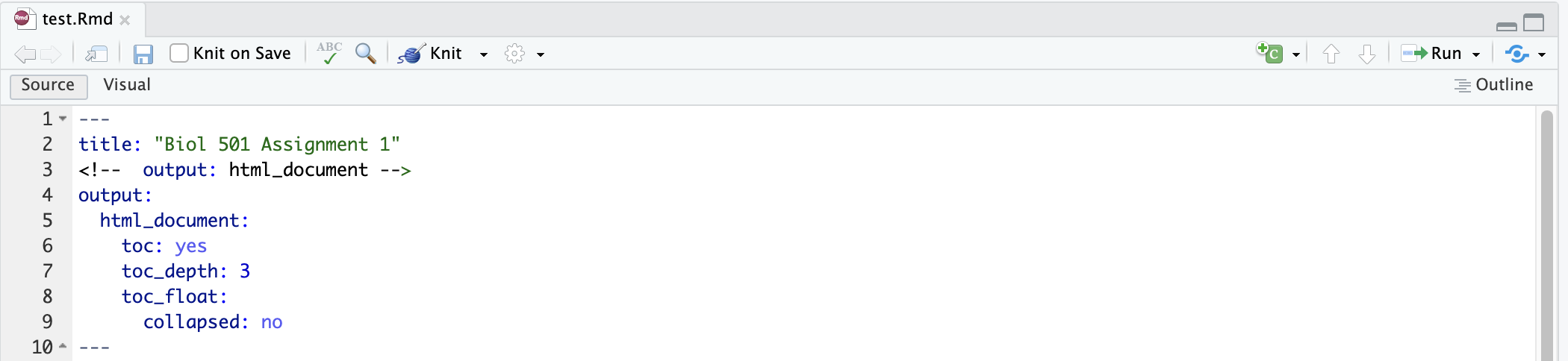
The top of the opened R Markdown file should look like the following. The section begins and ends with lines containing three dashes ‘-’ and sets output parameters (file type, document title, author name, table of contents style, etc.). For now, change only the title between the quotes and leave the rest of the code as-is. These instructions are to save your output to an html file and to include a floating table of contents.
Plain text
Now you can begin to write the bulk of your report in plain text.
Formatting text
R Markdown has a few shortcuts to help with formatting your text.
Examples are shown in the file test.Rmd.
To make a header, begin a line with one, two or three hash marks ‘#’.
A line with only three asterisks ’***’ will draw a horizontal line across the page in your output.
Text inserted between single asterisks will be in italics. Text inserted between double asterisks will be in bold.
LaTeX
RMarkdown understands LaTeX so you can include that kind of formatting in the text body too if you know it. For example, incuding the text “$x^2$” yields the output: \(x^2\)
Code chunks
R code in your R Markdown file will be placed in a code chunk. Code chunks begin and end between triple single backquotes ‘`’.
This first code chunk will contain global instructions
(knitr::opts_chunk$set). Here, the only global instruction
is to set the size of the figures produced in the output file. You can
modify this as you learn more about this and other global options in
RMarkdown.
The first line of code chunks also includes options between curly
brackets {r }. The option setup means that
this code chunk will contain global instructions.
include=FALSE means that although R Markdown will execute
the code herein, this chunk of code and its results will not appear in
the output file.

Subsequent code chunks will contain R code like that in the example
below. It too contains options between curly brackets {r }
but here they apply only to this code chunk. Put eval=TRUE
there so that code in this chunk will be executed when you knit it. For
example, you can change the figure height and width in this chunk. You
don’t need to specify include=TRUE to include the output of
the code in the results, because it is the default. Setting
message=FALSE will suppress annoying messages in the
output. You can also set warning=FALSE to silence warning
messages, but be careful with this one because sometimes the warnings
must be heeded. tidy=TRUE will wrap the code when it prints
(but not the comments).

Every once in while you might want to use eval = FALSE
in a code chunk instead, to prevent the code chunk in your document from
being executed. This can be helpful if you want only to make a point or
to show a variation of R code that also works but you don’t want to
clutter the resulting html file with the output too.
Knit
When you’re done editing, click the “Knit” at the top of the window with your R Markdown script. This will execute the R Markdown file and create the file “test.html” in your folder. A popup will show you what the resulting document looks like.
When you are ready to print your document, Knit it one last time, and in the popup window select “Open in Browser” at the top left. This will open the html file in Chrome or Safari and yield a better printout.
In your browser window, select “File -> Print” from the top menu and print your document to a pdf file.
© 2009-2024 Dolph Schluter